
Timesheets, jobs
and receipts,
from the phone,
not the clipboard.
KārgāhFlow replaces the clipboards, spreadsheets and group texts your team still uses. Clocking in, jobs and the roster, checklists, job profit and invoices, expenses, leave and messages in one app, built for cleaning and construction crews who start early and work across many sites.
See how it fits your week: cleaning or building services.
30
Days free, no card
13
Tools in one app
5 min
Min Setup
Dashboard
● 8 clocked in64.0
12
8
On the clock now
Jordan Tama
Henderson Site A
Mere Paki
Albany Medical Centre
Needs a decision
Fuel · $92.00
Jordan Tama · Henderson Site A
My Dashboard
Currently Clocked In
Takanini Industrial Park
04:22:15
Clocked in at 6:48 AM
4h 22m
Today
32h 10m
This week
Expense Approved
$240 · Site B fuel
Clocked In
Jordan Tama · 7:02 AM
Job Assigned
Rangi Sione · Botany Site
16
Integrated Modules
100%
Mobile Responsive
0
Paper Forms Required
24/7
Hour Access
Everything you need
Sixteen modules. One platform.
Zero spreadsheets.
From the first enquiry to the final payroll export, KārgāhFlow handles every step of running your crew, so you can focus on the job.
GPS Time Tracking
One-tap clock in/out from any device, with today’s rostered jobs marked and the one they’re standing at already chosen. Or switch on automatic clock-in, and the app clocks your crew in when they open it at the job. Every session is GPS-tagged with real-time visibility, so you know exactly who is working where, and for how long.
Real-timeJob Board, Enquiry to Paid
Every job gets its own number and moves across one board: Enquiry, Quote sent, Won, Booked, Under way, Finished, Invoiced and Paid. Each card shows its next step, like approving a finished job’s hours or creating its invoice, so the office’s day reads like a to-do list.
Numbered jobsRoster & My Week
Put people on jobs day by day, with a start time and a note. Everyone sees their own week on their phone, and gets one notification when it changes, never in the middle of the night.
Everyone’s weekJob Profit & Supplier Bills
See what every job makes while it runs: approved hours at your rates, plus the dockets and claims on it, against what each cost you. Charge by the hour, at a fixed price or as a cleaning contract by the week or month, and the crew snap receipts straight onto the job.
Profit per jobInvoices & Getting Paid
A finished job’s invoice is made from its approved hours, claims and dockets, already ticked for you, in your company’s name and colour. Your customer gets it by email with a page that shows how to pay. Late ones turn red with a polite reminder ready to send, and payments and credit notes keep every balance right.
Made from the jobChecklists & Sign-off
Build checklists, or photograph a paper one and the app drafts it. The crew fill them in on site with photos and signatures, scored against your pass mark as they go, and a customer’s new jobs get their checklists by themselves. Email the PDF report, and the customer signs the job off on the phone.
Signed PDF reportsCustomers & Sites
Keep every customer with their sites and contacts. Each site carries its address, how to get in, what to watch out for and who to call, and every job there shows them to the crew.
Site detailsTeam Management
Approve new workers, assign roles, and view complete profiles with hours logged, jobs completed, expenses submitted, and leave history at a glance.
Full profilesLicense & Certification Documents
Workers upload licences and certifications straight from their phone. AI auto-extracts the title, type, and expiry date, and anything close to expiring is flagged before it lapses.
Expiry flaggedJob Assignment & Maps
Create jobs with locations, assign crews, and track progress. Interactive maps with pins give workers instant directions to their next site.
Interactive mapsSite Boundaries & Location
Draw a boundary around any job site. Every clock-in and clock-out shows how far the worker was from site, with how accurate the phone’s reading was on the map.
On-site verificationAnalytics & Reporting
Visual charts showing hours by worker, job completion rates, expense trends, and team productivity. Filter by date range for payroll-ready data.
Visual insightsExpense Tracking
Workers photograph receipts and submit expenses from the field. Admins review and approve with one click. Complete audit trail for every dollar spent.
Receipt uploadsLeave Management
Sick leave, annual leave, public holidays. All handled digitally. Workers submit requests, admins approve or decline. No more lost paper forms.
Zero paperworkTeam Messaging
Threaded conversations between admins and workers. Receive instant push notifications on your phone the moment a new message arrives. Never miss an update, even when the app is closed.
Push notificationsSecure Access Control
Your data is locked to your company. Admins see the whole team, workers see only their own hours, claims and messages, and nobody joins until you approve them.
Locked to your companyHow it works
Up and running in three steps
From first sign-up to payroll-ready reports, get your entire team connected in minutes, not weeks.
Set Up Your Team
Workers register and request access. Admins review and approve accounts, assign roles, and get the entire crew onboarded in minutes, not days.
Plan & Track
Log the work on the job board, put people on it with the roster, and watch the hours roll in. GPS-tagged clock-ins, checklists and live dashboards show you how every job is going.
Review & Report
Approve each job’s hours, expenses and leave requests, invoice each finished job from its own figures, see what every job made, and export data for payroll. A shift on the wrong job is moved or split between jobs, and nobody’s pay changes.
See it in action
A tool for every role
Admins get the full picture, dashboards, analytics, and approval workflows. Workers get exactly what they need to clock in, submit expenses, request leave. Every screen is designed for speed and efficiency.
Hi, Sam
Ready to clock in?
0h 0m
31.7h
Today on the roster
YC-0042
Takanini Industrial Park
07:00 to 15:30 With Mia
Choose your job
Clock in at Takanini Industrial Park
A working demo: try Clock in, then Claims. Nothing here is saved.
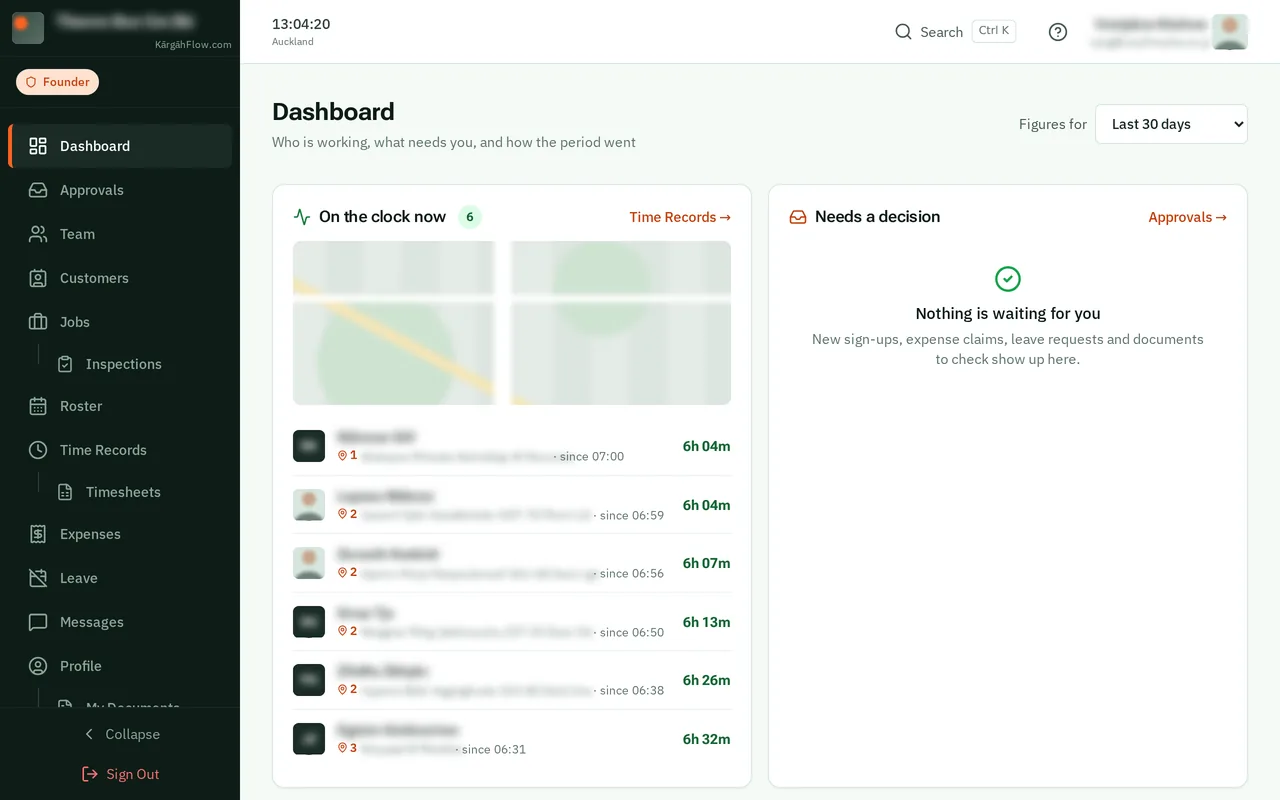
Real screens from a crew using KārgāhFlow. Names and details blurred.
Why KārgāhFlow
Not just another HR tool.
We built KārgāhFlow because generic workforce tools assume your team sits at a desk. Field staff (tradespeople, service crews, mobile teams) work on sites, in vehicles, and on the move. They need a platform that gets out of the way and lets them do their job.
Built for the Field
Designed for workers on job sites, not office desks. One-tap clock in, expense submission from your phone, instant job directions. Works beautifully on any device: phone, tablet, or desktop.
Enterprise-Grade Security
Your data is locked to your company and every connection is SSL/TLS encrypted. Workers see only their own hours, claims and messages, and nobody joins your team until you approve them.
Real-Time Visibility
Live dashboards show who is clocked in right now, where they are, and how long they've been working. Instant notifications for expenses, leave, and messages. No waiting, no chasing.
Your crew is already
working hard.
Give them tools that work just as hard. Replace the clipboard, kill the spreadsheet, and take control of your workforce. START TODAY!
Set up your company in minutes. No upfront payment required.